Days Between Dates in Excel: 4 Methods, When to Use Each
Put November 16, 2026 in cell A2 and December 31, 2026 in cell B2 (type them as real dates, e.g. =DATE(2026,11,16)). The formula =B2-A2 returns 45, DATEDIF(A2,B2,"d") returns the same 45, and NETWORKDAYS, with the 2026 holidays listed, returns 32. Same window, different questions. This post shows which formula answers yours, using that one worked window throughout.
How do I count days between two dates with simple subtraction?
=B2-A2 is the shortest correct answer for a plain calendar-day gap, as long as both cells hold valid date values. In Excel's default 1900 date system, dates are stored as serial numbers — November 16, 2026 is day 46,342 and December 31, 2026 is day 46,387 — so subtracting them is just 46,387 − 46,342 = 45 days. One classic trap: if the result cell is formatted as a date, the number displays as a date in 1900 instead of as a number. Format the result cell as General.
Plain subtraction counts the gap — the number of midnights from one date to the other. If your policy counts both endpoints ("including the start and end date"), use =B2-A2+1, which gives 46 days for the same window. These examples assume B2 is on or after A2: plain subtraction returns a negative number when the dates are reversed, so validate their order before relying on the inclusive formula.
What does DATEDIF do that subtraction can't?
DATEDIF calculates the breakdowns simple subtraction does not directly give: whole years, whole months, and the leftover components. =DATEDIF(A2, B2, "d") returns the same 45 days as subtraction (for a pure day count it adds nothing), but "m" gives whole months, "y" whole years, "ym" months ignoring years, and "yd" days ignoring years. That is what you want for ages and tenures.
Two things to know: DATEDIF is retained for compatibility with older Lotus 1-2-3 workbooks and generally does not appear in Excel's formula autocomplete; type it manually and it works. And Microsoft documents a genuine bug in the "md" unit (days ignoring months and years), which can return inaccurate, zero, or negative results. For day counts, use "d" and nothing else. If the start date is later than the end date, DATEDIF returns #NUM! rather than a negative number.
When should I use DAYS() instead?
=DAYS(B2, A2) is a named alternative to subtraction, available in Excel 2013 and later, with the end date first and the start date second. For valid date-only numeric inputs it returns the same 45 as subtraction. Excel's function tooltip labels the arguments end_date, start_date, and the function appears in autocomplete. Use it when you prefer a documented function over a bare operator.
How do I count only business days in Excel?
=NETWORKDAYS(A2, B2) counts working days and considers both endpoints, counting each one only if it is a working day under the weekend rules. For November 16 to December 31, 2026 it returns 34, skipping the 12 weekend days in the window. Add a holiday list as the third argument and it skips those dates too: with =DATE(2026,11,26) (Thanksgiving) and =DATE(2026,12,25) (Christmas) in H2:H3, =NETWORKDAYS(A2, B2, $H$2:$H$3) returns 32 business days counting both ends, or 31 business days with =NETWORKDAYS(A2+1, B2, $H$2:$H$3) if your terms say the count starts the day after the start date. That A2+1 shift is an explicitly chosen policy, not a rule NETWORKDAYS applies on its own.
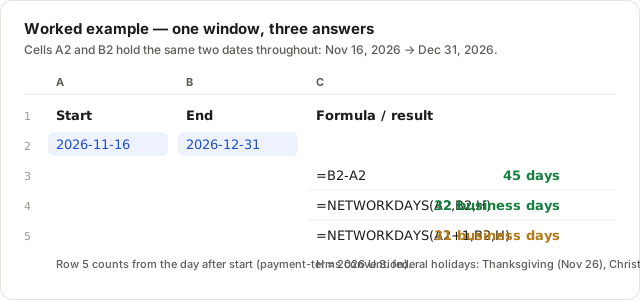
If your weekend is not Saturday/Sunday, switch to NETWORKDAYS.INTL(start, end, "0000001", holidays), where the seven-digit code marks non-working days from Monday to Sunday; "0000001" means Sunday-only weekends.
Which formula should I actually use?
Use subtraction for elapsed calendar days, DATEDIF for complete years or months, and NETWORKDAYS for working days. Then sanity-check the result against a separate calculation before it goes into an email or a contract:
- Calendar-day gap (deadline, notice period):
=B2-A2. Both endpoints count:=B2-A2+1. - Months or years breakdown (age, tenure):
=DATEDIF(A2, B2, "y")and"ym"units. - Modern plain count:
=DAYS(B2, A2)— end first, start second. - Business days (SLAs, payment terms):
=NETWORKDAYS(A2, B2, holidays); terms that start the next day useA2+1.
To verify a count someone handed you, run the same two dates through the days between dates calculator (calendar days, exclusive and inclusive side by side) or the business days calculator (all three conventions with U.S. federal holidays on a toggle), a separate calculation that catches a mistyped formula or a wrong counting convention.
Have more questions about counting dates in Excel?
Why does =B2-A2 show a date in 1900 instead of a number?
In Excel's default 1900 date system, dates are stored as serial numbers — day 1 is January 1, 1900 — and a formula result inherits the formatting of its cell. If the cell is formatted as a date, the result displays as a date in 1900 instead of a number. Select the result cell and press Ctrl+Shift+~, or set the format to General, to see the number.
Does NETWORKDAYS count the start date?
NETWORKDAYS considers both endpoints, but counts each one only if it is a working day under the weekend and holiday rules — so a Monday-to-Friday range returns 5, not 4. If your policy says the count starts the next business day, shift the start explicitly: =NETWORKDAYS(A2+1, B2, holidays). With the 2026 holidays in the list, our example window returns 32 business days including the start, 31 excluding it.
How do I exclude holidays in Excel?
Pass a range of real Excel dates as the third argument: =NETWORKDAYS(A2, B2, $H$2:$H$12). For this post's example, enter =DATE(2026,11,26) in H2 and =DATE(2026,12,25) in H3 and use =NETWORKDAYS(A2, B2, $H$2:$H$3). Dates in that range are skipped in addition to weekends. Text that merely looks like a date does not count, and NETWORKDAYS never supplies a holiday calendar on its own. Use NETWORKDAYS.INTL(start, end, weekend_code, holidays) for custom weekends: the seven-digit code marks non-working days from Monday to Sunday, e.g. "0000001" for Sunday-only weekends.
Why doesn't DATEDIF autocomplete in Excel?
DATEDIF is retained for compatibility with older Lotus 1-2-3 workbooks. It generally does not appear in Excel's formula autocomplete, so you type it manually — but it works once entered. Microsoft also documents a real bug: the "md" unit (days ignoring months and years) returns inaccurate, zero, or negative results in some cases. Stick to "d" for day counts.
Should I use DAYS() or DATEDIF?
For a plain day count, =DAYS(end, start) (in Excel since 2013, autocomplete-friendly, with the arguments labeled end_date and start_date in the tooltip) is a named alternative to subtraction. Reserve DATEDIF for breakdowns DAYS() can't do: "ym" (months ignoring years) or "yd" (days ignoring years), such as ages and tenures.
How do I count both dates inclusively in Excel?
For date-only values with B2 on or after A2, add one: =B2-A2+1. Plain subtraction counts the gap — the number of midnights between the two dates — so Nov 16 to Dec 31, 2026 gives 45. If your policy says "including the start and end date," the same window is 46 days. Contracts mix the two conventions freely, so check which one yours uses before relying on the number.
Last updated 2026-11-11 · Calculations follow the full leap-year rule (including the year 2100 exception).